Effective source code management and version control are at the heart of every collaborative open-source community. By tracking changes, coordinating work across contributors, and enabling rollback when needed, these systems keep projects organized and responsive. Below, I will examine how MDN Web Docs (specifically its mdn/translated-content repository) utilizes GitHub’s Git-based workflow.
The mdn/translated-content repository is community-driven, operating under Mozilla’s governance guidelines. Changes are reviewed through a peer-review process: CODEOWNERS files assign area-specific reviewers (often native-speaker maintainers), and all pull requests (PRs) must pass CI checks before being merged. Major policy updates (e.g. new macro conventions or branching rules) are proposed and ratified via GitHub Discussions or Mozilla’s public community forums.
MDN Web Docs: mdn/translated-content on GitHub
MDN’s translated content repository manages localized versions of its documentation in dozens of languages. Here’s a typical contributor workflow:
- Fork & Clone
- Contributors fork
https://github.com/mdn/translated-contentinto their own GitHub account, then clone locally.
- Contributors fork
- Labels & Issue Tracking
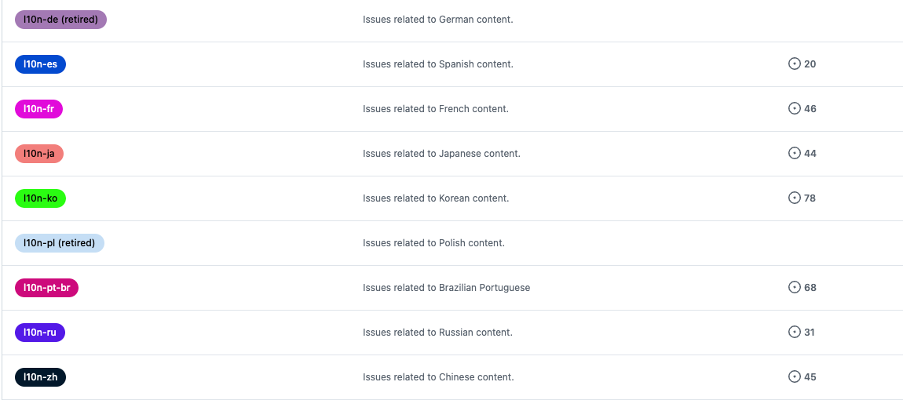
The repository uses language-specific labels (e.g. lang:ru, lang:es) to tag issues and pull requests, making it easy to filter work by locale.
3. Sync Upstream
- Before starting, they add MDN’s main repo as an
upstreamremote: git remote add upstream https://github.com/mdn/translated-content.git git fetch upstream- This ensures their fork stays in sync with the latest English source and any structural changes.
4. Create a Branch
- For each new feature or locale update, contributors create a branch named by language code and issue, e.g.:
git checkout -b fr-css-grid-updates
5. Translate & Update
- Inside the appropriate
/en-US/-mirrored folder structure, they update markdown files with translated text, ensuring front-matter metadata remains intact.
6. Quality Checks
- Automated GitHub Actions run link checkers and style reviews on every push, flagging broken links or formatting issues.
7. Push & Pull Request
- Contributors push their branch to their fork and open a pull request (PR) against MDN’s
mainbranch. They select the “translation” template, which prompts them for the locale, scope, and any outstanding questions.
8. Review & Merge
- Native-speaking reviewers and MDN maintainers review the PR, suggest edits, and once approved, merge it back into
main. A GitHub Action then syncs those changes to the live translated site.

This Git-centric workflow scales across hundreds of volunteer translators while ensuring consistency with the English source.
Other Open-Source Version Control Workflows
While Git on platforms like GitHub and GitLab dominates today, different communities adapt version control to their needs:
- Linux Kernel (Git + Mailing List Patch Workflow)
Linus Torvalds created Git to manage the Linux kernel’s massive contributor base. Kernel development still uses a patch-submission workflow over mailing lists: developers push topic branches to public repos, email formatted patch series to maintainers, and patches are merged viagit pullcommands. This highly decentralized model emphasizes review transparency and granular commit history. - Apache Projects (Subversion → Git Migration)
Historically, many Apache projects used Apache Subversion (SVN). Contributors would check out a central repository, edit files, thensvn commit. Today, most Apache projects have migrated to Git (often hosted on GitHub or GitLab) but retain a “trunk, branches, tags” model familiar to SVN users. They leverage Git’s speed and branching while maintaining SVN-style release workflows.
In summary, MDN’s use of GitHub—with its fork-and-branch model, issue labels, and automated checks—strikes a balance between openness (allowing anyone to contribute) and quality control (enforcing standards through reviewers). However, depending on your project’s size, governance needs, and CI/CD requirements, platforms like GitLab, Gerrit, or even SVN may better suit your team’s workflow.